Kafka at Scale: Partitions, Consumer Lag, Rebalancing, and Running It in Production
Kafka will take almost anything you throw at it on day one. The trouble comes later. A topic can’t keep up because it has too few partitions. Consumers stop for 30 seconds every time a pod restarts. One broker runs hot while the rest idle. Nothing exotic, just the defaults meeting real traffic.
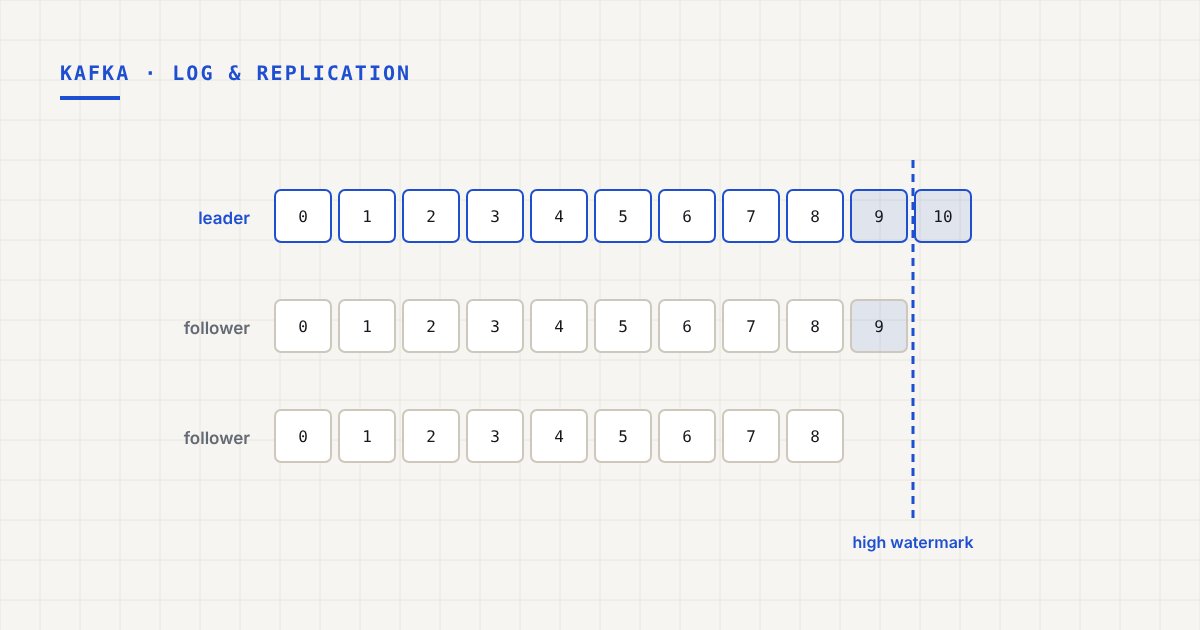
These are the decisions I think matter most once Kafka is load-bearing. For the “why” behind the storage and replication model, read Kafka internals first.
Partitions are your unit of parallelism
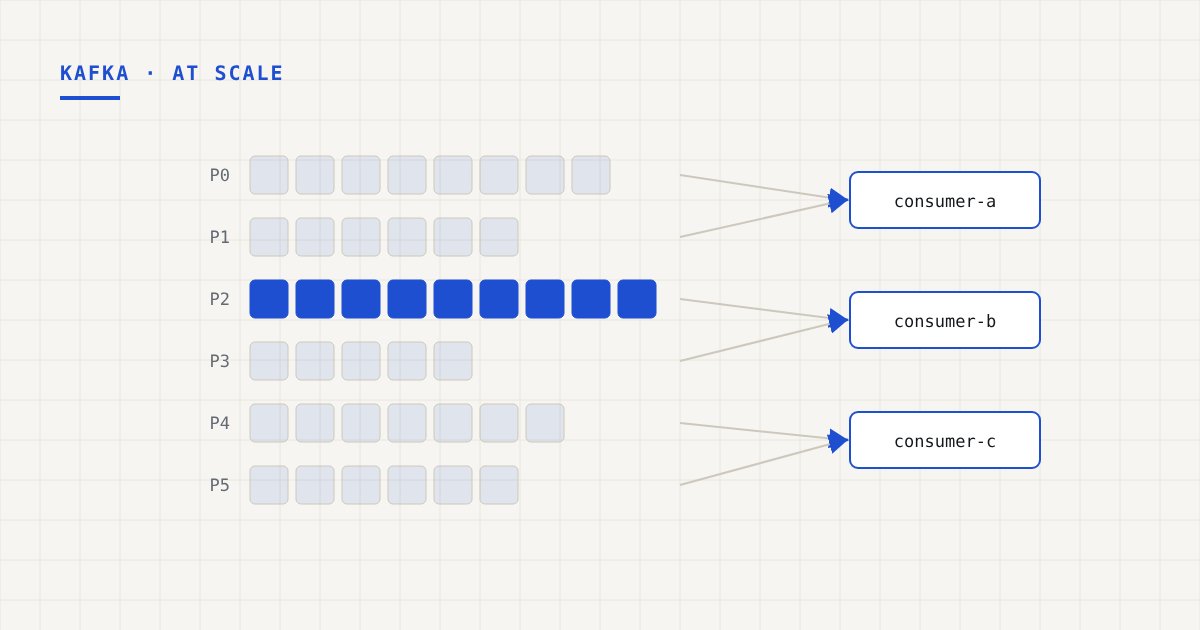
Within a group, each partition is consumed by exactly one consumer at a time. So partition count is the ceiling on parallel consumers. Twenty partitions, twenty active consumers at most, however many pods you deploy.
One reasonable way to size it:
- Measure what one consumer can process per second for your real workload, including the database writes or API calls it makes. Call it C.
- Take your target peak throughput T, with headroom for growth and for catching up after an outage.
- You need at least T / C partitions. Round up generously.
Two things make this decision sticky. You can add partitions but never remove them. And adding partitions changes which partition a key maps to: with the default partitioner, hash(key) % partitions shifts, so new records for a key can land somewhere other than the old ones. If you rely on per-key ordering, adding partitions to a live topic needs a plan.
So start with more partitions than you need today. Just don’t go wild. Every partition costs memory, file handles, and replication traffic on the brokers, and very high counts slow down leader elections and rebalances.
Hot partitions and key skew
Parallelism only helps if load spreads evenly. If one tenant generates 40% of your traffic and you key by tenant ID, one partition takes 40% of the load and a single consumer chews through it alone.
Ways out, from least to most invasive:
- Pick a finer key. Key by order ID or user ID instead of tenant ID, if you only need ordering at that level.
- Salt hot keys. Append a small suffix (
tenant-7#0totenant-7#3) for known heavy keys. You trade strict per-tenant ordering for spread, so only do this where ordering within the key doesn’t matter. - Split the heavy traffic out. Sometimes the honest answer is a dedicated topic for the noisy workload.
Ask the ordering question out loud: what’s the smallest scope where order actually matters? Usually smaller than people assume.
Consumer lag is the metric that matters
Consumer lag is the gap between the latest offset in a partition and the group’s committed offset. Nothing tells you better whether consumers are keeping up.
kafka-consumer-groups.sh --bootstrap-server broker:9092 \
  --describe --group order-processor
Some things I’ve learned about using it:
- Lag in messages is misleading across topics. 10,000 messages of lag on a topic doing 50,000/sec is 200ms. On a topic doing 10/sec it’s 17 minutes. Alert on time lag instead (how old the oldest unprocessed message is).
- Watch the trend, not the value. Steady lag that isn’t growing is fine. Lag that grows every minute means you’re under-provisioned.
- Look per partition. Total lag can look fine while one partition, the hot one or the one with a stuck consumer, falls hours behind.
Rebalancing: the hidden source of pauses
When a consumer joins or leaves a group, partitions get reassigned. That’s a rebalance. Under the old eager protocol, every consumer gives up all its partitions, waits for the new assignment, and starts again. Everyone stops, even consumers whose partitions don’t move.
Rolling deploys on Kubernetes restart pods one at a time, so that can mean a stop-the-world pause per pod. A 20-pod rollout is 20 rebalances.
Fixes, roughly in order of impact:
Cooperative rebalancing
With the CooperativeStickyAssignor, consumers give up only the partitions that actually move, and everyone else keeps working. On the classic protocol, I’d call this the most valuable consumer setting there is:
partition.assignment.strategy=org.apache.kafka.clients.consumer.CooperativeStickyAssignor
Static membership
Give each consumer instance a stable group.instance.id (a pod name from a StatefulSet works well). When a static member restarts and rejoins within session.timeout.ms, it gets its old partitions back and no rebalance happens at all. Set the session timeout a bit longer than a typical restart.
The new consumer protocol
Kafka 4.0 made the new consumer group protocol from KIP-848 generally available (group.protocol=consumer). Assignment moves to the broker, and rebalances become incremental by design, without the group-wide synchronization barrier. If your brokers and clients support it, adopt it.
Don’t trigger rebalances by accident
max.poll.interval.ms (5 minutes by default) is the maximum time between poll() calls. If one batch takes longer than that, the consumer is considered dead and kicked out. That causes a rebalance, it rejoins, and often does the same thing again. Seeing repeated rebalances under load? Lower max.poll.records or speed up processing before you raise the interval.
Producer settings for throughput
At scale, the producer’s job is to send fewer, bigger requests:
linger.ms: wait a few milliseconds so batches fill. 5 to 20ms is common for throughput-oriented producers.batch.size: the default 16 KB is small for high-volume topics. 64 KB to 256 KB is a common range.compression.type:zstdorlz4. Compression works per batch, so it pairs well with linger, and it cuts network and disk usage on the brokers too.acks=allwith the idempotent producer: keep it. Once batching is tuned the throughput cost is smaller than most people expect, and without it your durability settings don’t mean much.
On the Go side, I covered how to structure a fast producer pipeline in building high-throughput Kafka pipelines in Go.
Keeping brokers balanced
Clusters drift. New topics land unevenly, some partitions get much busier than others, and leadership piles up on a few brokers. You’ll notice one broker’s CPU or disk sitting far above the rest.
- Rack awareness. Set
broker.rackso replicas of a partition land in different availability zones. Losing a zone then can’t take out every replica of a partition. - Follower fetching. With
client.rackset, consumers can read from a replica in their own zone instead of the leader. On cloud providers that can noticeably cut cross-zone network costs. - Rebalance partitions deliberately. Use partition reassignment with a replication throttle so moving data doesn’t saturate the network. Tools like Cruise Control automate this based on actual load.
- Tiered storage. Kafka 3.9 made tiered storage production-ready. Old segments move to object storage and brokers keep only recent data locally. Long retention no longer dictates disk size, and adding brokers means moving far less data.
Monitor what predicts trouble
Beyond consumer lag, the broker metrics I’d put on a dashboard first:
- Under-replicated partitions. Should be zero; non-zero for more than a moment means a broker is struggling or down.
- Under-min-ISR partitions. These are rejecting
acks=allwrites right now. - Produce and fetch request latency at p99, per broker.
- Network handler and request handler idle ratio. When these trend toward zero, the broker is saturated.
- Disk usage and growth rate, per broker.
For a real-world example of moving Kafka traffic between regions, see the Kafka cross-region migration case study.
Takeaways
- Partition count caps consumer parallelism. Size it from measured per-consumer throughput, with headroom.
- Adding partitions remaps keys. Plan for that if you rely on ordering.
- Alert on consumer lag in time, per partition, and on its trend.
- Cooperative rebalancing plus static membership (or the new consumer protocol) stops deploys from pausing everything.
- Tune producers for bigger compressed batches, and keep
acks=all. - Under-replicated and under-min-ISR partitions are your early warning.